IGIT Related Posts With Thumb Image After Posts

Description

- The IGIT Related Posts With Thumb After Posts Plugin Automatically inserts one widget after posts having related posts.

- Related Posts showing by title and content matching, If it not show related posts by title content matching it will search related posts by matching tags and title and if still it is not showing any related posts then it will show random posts.

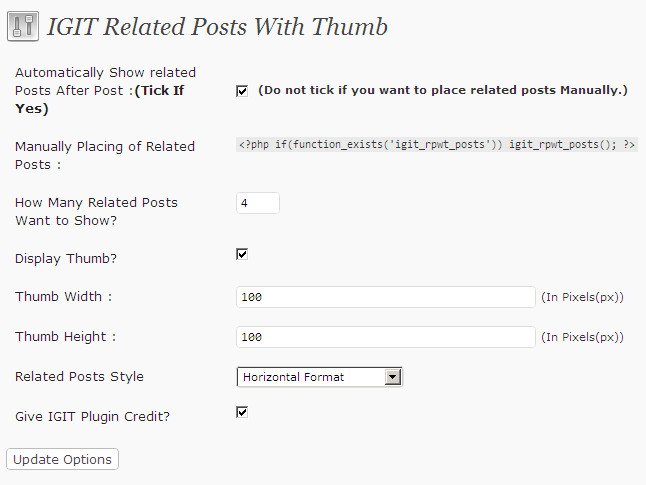
- This plugin also empowers the Blog administrator to place manually related posts widget, Also having options to give related posts number,Display Thumb or not,Set Thumb Width and Height and Main thing it is giving three options to select related posts style – Horizontal, Vertical, Simple Style.

- By using this plugin on your blog you can attract your visitors to other related articles of your blog.

- This plugin is also SEO friendly.

- Ajax Based Admin Options.

- Exclude Categories from Related Posts.

- Note : This plugin is showing thumb images which are exists in posts and also exists on same server, Images from remote server are not showing in related posts to prevent bandwidth theft.

Download IGIT Related Posts With Thumb Image After Posts

Download

Hi,
You can download this plugin from here :

Download IGIT Related Posts With Thumb Image After Posts

Purchase
Hi,
this plugin find related post by categories and tags and it would cost you only $ 21. This plugin will show related post in same format but by category and tags.

Simply you have to do is click on below buynow button pay me $ 21 and send me your transaction id and your paypal email address by which you made payment to my email address anku.gandhi[@]gmail.com.

pixel IGIT Related Posts With Thumb Image After Posts

Features
1. Automatically inserts one widget of Related Posts after post.

2. Enter Related Posts Number to Show.

3. Option for Display Thumb or not.

4. Option to enter Thumb Width and Height.

5. Three options to select related posts style – Horizontal, Vertical, Simple Style.

6. Ajax Based Admin Options.

7. Exclude Categories from Related Posts.

= Included Files =

- igit-rpwt.php

- timthumb.php

- inc Folder (contains files for admin and front end)

- images folder

Installation
Installation process is a easy 4 step procedure.

1. Download the zip folder named igit-rpwt.zip

2. Unzip the folder and put it in the plugins directory of your wordpress installation. (wp-content/plugins).

3. Activate the plugin through the plugin window in the admin panel.

4. Go to setting->IGIT Rel Post With Thumb to configure settings.

FAQ

= How can i Change look and feel of widget?

- To Change look and feel and any customization Contact Me .

*NOTE: If you have any other queries or problems regarding the plugin please contact us at: – Contact Me

ScreenShots

IGIT RPWT Admin IGIT Related Posts With Thumb Image After Posts

IGIT RPWT Admin

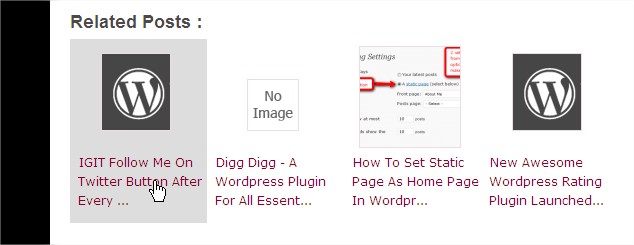
Related Posts on blog after post :

IGIT RPWT IGIT Related Posts With Thumb Image After Posts

IGIT RPWT

Changelog
= 4.0 =
Latest Timthumb Used.

= 3.9 =
- Change Logic tats why images from other domains not showing and breaking structure. So get default image if images are from other domain.

= 3.8 =
- Look and feel change of related posts and also scan of post content for image logic change.

= 3.7 =
- Bug Warning Solved. Warning: array_key_exists() [function.array-key-exists]: The second argument should be either an array

= 3.6 =
- One Critical Bug Solved.If theme doesn’t support featured image then it is giving fatal error, So solved it.

= 3.5 =
- Added new functionality to find images by first check custom field , if not found check featured image , if not found scan content , if not found check for an image by attachment and lastly no image found then show default image, it means this plugin searching all things in a post for image and if image found it shows images and if not found then it shows default image.Also added new field to enter custom message for no related posts found.

= 3.4 =
- Add new feature Font-Family and Font Size.

= 3.3 =
- Add new feature to display title or not for horizontal style.

= 3.2 =
- Fix : When thumb not shows then height of related posts auto adjusted.

= 3.1 =
- After release version 3.0 with tooltip I found that It have some major problems So instantly I again release other version without tooltip.

= 3.0 =
- Added new tooltip which shows content of post.

= 2.1.4 =
- Some function changes.

= 2.1.3 =
- Make Related post section clickable. First it was clickable only on image and link but now it is clickable anywhere.

= 2.1.2 =
- Bug removed in which Related Posts Showing password protected posts.

= 2.1.1 =
- Related post logic chnaged, Now related posts will show different everytime.

= 2.1. =
Some more features added and also added stylesheet.

= 2.0. =
Color Customization option added.

= 1.9. =
Checkbox data not saving error removed.

= 1.8. =
Change algo for searching related posts and also noimage bug removed.

= 1.7. =
More efficient for showing no images for remote server images and also little bit change in related posts algorithm and exclude categories.

= 1.6. =
If image in posts are remote hosted images than it will be replaced by no image. We can’t show remote hosted images to prevent bandwidth theft.

= 1.5. =
in_array argument bug resolved.

= 1.4. =
Exclude Categories Feature added.

= 1.3. =
I got so many mail from users that it is always showing No related posts, So I have chnaged related posts algorithm So now if it not find related posts by content and title then it will try to find related posts by tags and if it will not find related posts by tags then it will show posts randomly.

= 1.2. =
Heading text added in admin and also first time plugin not working problem solved.

= 1.1. =
Image Not showing problem and also related posts width problem solved.

= 1.0. =
- This is the very first release of the IGIT Related Posts With Thumb After Posts plugin. The code base isn’t all that pretty hence the
possibility of many bugs.

- Users will be informed every time the plugin upgrades.

  • http://www.pinoypharmacy.com Pharmacist

    I just found your plugin.I'll try it now.

  • grlwithgumption

    thank you so much for this awesome plugin, i just have two questions:
    1) how is this plug-in determining the related posts? From what I can tell it seems random.

    2) where can i access the .css stylesheet I would like to customize it a bit.

    thanks

  • http://www.hackingethics.com/ Ankur Gandhi

    Thanks.

    First it is determining related posts by matching title and content with other posts, If it not find anything it will try to find related posts by matching tags with posts title and finally if it not get any result than it will show random posts.

    if you want to change CSS than in inc/core.php there are css part which included according to selected related posts style. If you need any help contact me on anku.gandhi@gmail.com

    Thanks
    Ankur

  • http://sandboxgames.fr SandBox

    Hi, I have the same bug as Massa P and it still doesn't work at all for me.
    My blog: sandboxgames.fr

  • http://www.touchit-design.co.za Nicolette

    Thanks for a great plug in Ankur. I have the latest 1.8 version but I have the same problem others have of some post thumbnails not showing. Can you help?

  • http://fruityoaty.com fruityoaty

    Two issues with the latest version 1.8 – seems they broke:
    “Automatically Show related Posts After Post” checkbox
    “Give IGIT Plugin Credit” checkbox
    After clicking “Update Options” button, the selections are always enabled, even if I unchecked the boxes.

    Feature/change requests:
    1. In settings, to be able to specify location of my own default image that I choose (right now, I always have to hack the plugin every time there's a plugin update).

    2. “Heading Text” textbox has maximum input of 60 characters. The text I want to put in there is at least 70 characters… could you increase to maybe 75?

    Thanks for this plugin. :)

  • http://www.skyle.net Skyle

    i'm having the same problem

  • Djjuvan

    Plugin is fucked up…. from update v1.8 it doesnt show any other related posts except four the same all the time. Sux!

  • http://www.hackingethics.com/ Ankur Gandhi

    - Sorry for inconvenience.
    - Version 1.9 relesed.

    - checkbox functionality not working – Solved.
    - Heading Text textbox maximum length increased to 100 characters.
    - setting for Own default image will be in next version.

    thanks
    Ankur

  • http://www.hackingethics.com/ Ankur Gandhi

    Upgrade to new version 1.9,It will solve problem.

    Thanks
    Ankur

  • http://www.hackingethics.com/ Ankur Gandhi

    Some post thumbnails are not showing because they have caption.

    One user currently reported me that if image has caption then it is not showing in related post.

    I am working on it, and it will solved in next 2.0 version.

    Also today I have released new version 1.9 So upgrade your version.

    Thanks
    Ankur

  • Christian

    Great plugin. Can have it to show the full title of the post?

  • http://www.hackingethics.com/ Ankur Gandhi

    Hi Christian,
    Thanks for like this plugin.

    If you want to show full title of the post then go to this plugin directory and then open core.php file exists in inc folder (inc/core.php) search “substr($title, 0, 45)” without quotes and replace it with “$title” without quotes and save your file.

    Let me know if it not work and you want any help.

    Thanks
    Ankur

  • Christian

    Worked great. Thank you. For anyone else who want to do this: also remove the … after the ' or it will look weird.

  • http://twitter.com/Bendayan Pierre Bendayan

    How to modify the code so that the tumbnail is generated from a custom field instead? In my case I don't want to add a visible image to the post. I'd rather use a custom field named “thumbnail” etc. Is it possible to manage without to much coding?

  • http://www.hackingethics.com/ Ankur Gandhi

    Hi Pierre,

    I can do it. If you want to do this then meet me online.

    My gTalk id is anku.gandhi@gmail.com.

    Thanks
    Ankur

  • http://www.touchit-design.co.za Nicolette

    Thanks so much for helping me out Ankur! Seems like your courtesy has landed you a job. I'm looking forward to see your work.

  • Djjuvan

    When can we expect the 2.0 version?

  • http://www.hackingethics.com/ Ankur Gandhi

    Hi,

    Version 2.1 Has Been Released with Customized Color Option. So upgrade your plugin to new latest version and customize look and feel of your related posts.

    Thanks
    Ankur

  • Retonas

    Thank you for this plug-in!!
    The thumbnails don't show yet for wrdpress 3.0 and last IGIT version Version 2.1.1

  • http://www.hackingethics.com/ Ankur Gandhi

    can you give me your site? or contact me on anku.gandhi@gmail.com

    I have checked it and this plugins showing image perfectly. I can give you hundreds of example sites.

    Thanks
    Ankur

    • Stanleyek

      I have the same problem. Thumbnails won’t show up and changing thumbnail options dosen’t help at all.

    • Elpapo

      Likewise, I have WordPress 3.0.1 and it does not display images. Very frustrating…

    • Camille

      Hi,

      I am also on 3.0.1 using the latest version of this plugin, and images won’t show up as well.

      • Anonymous

        Have you made sure that the cache folder within the plugin has rewrite rules of 777?
        Timthumb needs full access to it for thumbnails to work properly

  • Notlikely

    I used this plugin pretty easily until I tried to look at the html code. I was surprised at how much extra coding is inserted and then how it had this little quirk of forcing the scroll bar back to the top. It seemed like it was trying to hide something. I do not recommend using any pluggin that overrides the user.

  • Retonas

    For me thumbnails don't show yet for wrdpress 3.0

  • http://fruityoaty.com fruity oaty

    OMG! I didn't notice until today that the plugin is showing thumbnails derived from images contained in password-protected posts (PRIVATE stuff)! Please fix, asap. Thankfully, I don't have many private posts, but I was quite dismayed to see those images that are supposed to be private.

  • http://fruityoaty.com fruity oaty

    i.e. instead of showing thumbnails derived from images contained in password-protected posts, show the default generic “no image”… or just don't show the private post as a related post at all…

  • http://www.hackingethics.com/ Ankur Gandhi

    Can you tell me which extra coding you see in this plugin?

  • http://www.hackingethics.com/ Ankur Gandhi

    Hello,

    I apologies for this mistake. I am working on this and fix it asap in next update.

    Thanks

  • http://www.hackingethics.com/ Ankur Gandhi

    Hi Retonas,

    Can you give me your website link?
    It is working in wordpress 3.0, I am using it on my 5 to 6 websites and also other users are using it on wordpress 3.0.

    May be there will be some other reason your images are not showing.

    Thanks
    Ankur

  • serge

    me too, i don't have the thumbnails. i have the latest version of the plugin.
    strange

  • http://www.viktorix.com/ Viktor Nagornyy

    Hi Ankur,
    Awesome plugin! Works great. Is it possible to add brief description below the title? This way in vertical format it won't have so much empty space. It would be nice if we were able to specify how many characters to allow to show from the post excerpt. Why excerpt? It's easier, because if you pull beginning of the post text sometimes we have images there, so you would have to write code to strip html tags and such… using excerpt saves on coding and file size.

    Really looking forward to this feature.

  • http://www.allinknowl.com Allinknowl

    hey ankur, thanx fr the plugin.. I am using it on wp 2.9.2 but i lost the default configuration somehow..I just wanted to know what was the default attribute for the 'heading text' option?

  • http://www.hackingethics.com/ Ankur Gandhi

    Hi Allinknowl , Thanks for using this plugin.

    Default Configuration for heading text is :

    < h1 >You might also like< /h1 >

    Please remove spaces in < h1 > and < /h1 >

    I have added you on gTalk So please come online.

    Thanks
    Ankur

  • http://www.viktorix.com/ Viktor Nagornyy

    Hey,
    I just realized that this plugin breaks WP3 menu feature. When it's activated you can no longer drag and drop menus. Can you look into this?

    Thanks, love this plugin though.

  • Webmoneyco

    Hey Guys, First of all thank you for the plugin. Heres a small mod. The plugin will only show thumb if images in the post come before text. If text comes first then image you will get no image found. To fix that this what you need to do. Open core.php find: preg_match_all('|<img.+src=['"]([^'"]+)['"].*>|i', $result->post_content, $matches); and replace with: $image=preg_match_all('|<img.+src=['"]([^'"]+)['"].*>|i', $result->post_content, $matches); also find this: if(!strstr($image,$bgurl)){

    $image = WP_PLUGIN_URL . '/igit-related-posts-with-thumb-images-after-posts/images/noimage.gif'; // when no image found in post

    }

    and change to:

    /*if(!strstr($image,$bgurl)){

    $image = WP_PLUGIN_URL . '/igit-related-posts-with-thumb-images-after-posts/images/noimage.gif'; // when no image found in post

    }*/

    simple:)

  • Anonymous

    Hey! I’ve just upgraded your plugin to the latest version, I now have version 3.0 and it caused problems with me uploading images and inserting tags.

  • Jay

    Hey, I love this plugin, but the update to version 3.0 has caused a huge display problem. I’ve never had any other problems with this before. Is their a bug with Version 3.0?

  • http://www.hackingethics.com/ Ankur Gandhi

    Hi @Jay, @abingabanger I aplogies for problems you having, I am releasing new version 3.1 in next 10 minutes without tooltips, So one request to you is to upgrade to 3.1 ASAP.

    Thanks
    Ankur

  • http://www.hackingethics.com/ Ankur Gandhi

    Hi @abingabanger I aplogies for problems you having, I am releasing new version 3.1 in next 10 minutes without tooltips, So one request to you is to upgrade to 3.1 ASAP.

    Thanks
    Ankur

  • Anonymous

    Hey! thank you, I’ll be waiting for the 3.1 version. Great plugin by the way!

  • Pingback: TinhWRL.com – Thủ thuật kiếm tiền online » TẠO BÀI VIẾT LIÊN QUAN VỚI IGIT REL POS

  • Kizzy

    Hi! I’ve just installed your plugin. However, it is NOT showing the images I have on my site (from Flickr). How can I fix this? I want them to show, I don’t want empty thumbnails….

    Kizzyonlinedotcom

  • luchosar

    This plugin is a beauty.
    There is to be placed in the index, but not related but show a specific category … thanks.

  • http://www.hackingethics.com/ Ankur Gandhi

    Hi luchosar

    Thanks for like this plugin.

    I didn’t get what you want to say in your last line, So can you tell me again what you want to say?

    Thanks
    Ankur

  • Karimutti

    could any one explain me whats the use of this plugin…….. and wr it is used ?pls……?

  • http://www.hackingethics.com/ Ankur Gandhi

    Hi Karimutti ,

    This plugin is to show related posts after post, means related post will show in single post page and after post. Also this plugin show related post with image thumbnails. Apart from this this plugin have so many other options. So just try to install this.

    Thanks
    Ankur

  • Majron

    great widget, easy to use

  • wendy

    DEAR, I want make this plugin to show remote server images, what can I do .? please tell me . very very thank you ! very very thank you ! very very thank you !

  • Cuinan621

    DEAR, I want make this plugin to show remote server images, what can I do .? please help me

    very very thank you !! very very thank you !! give me email : cuinan621@gmail.com

  • http://www.hackingethics.com/ Ankur Gandhi

    Hi Cuinan,

    If you want to show remote server images then you have to customize code for this plugins , change code of plugin to allow remote server images. If you want to do this then come online on gTalk. My id is anku.gandhi@gmail.com . I sent you email already.

    Thanks
    Ankur

  • http://www.hackingethics.com/ Ankur Gandhi

    Hi Wendy,

    If you want to show remote server images then you have to customize code for this plugins , change code of plugin to allow remote server images. If you want to do this then come online on gTalk. My id is anku.gandhi@gmail.com .

    Thanks
    Ankur

Get Adobe Flash playerPlugin by wpburn.com wordpress themes

Subscribe to HackingEthics

Enter your email address: