
 Hello Friends, Yesterday when I was writing post on my blog then at the time of autosave it gave me error like “Warning: Cannot modify header information – headers already sent by” in pluggable.php. In my case it was giving in pluggable.php but in your case it would be anything. So I have tried to solve it and search for this solution on internet, Finally I got one solution that worked for me which I have explained below.
I was getting error like this
Warning: Cannot modify header information – headers already sent by (output started at /home/htdocs/wordpress/wp-config.php:1) in /home/htdocs/wordpress/wp-includes/pluggable.php on line 1318
I am getting this error in wp-includes/pluggable.php and on line 1318 but in your case file name and line might be different from me. So to rectify this error, Just go through below steps :
1. Download wp-config.php via FTP and Open wp-config.php to edit.
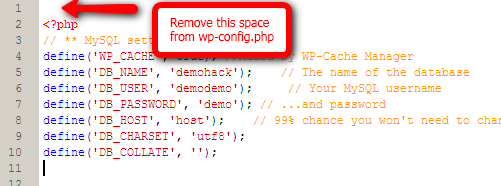
2. Remove Spaces from Top of wp-config.php :
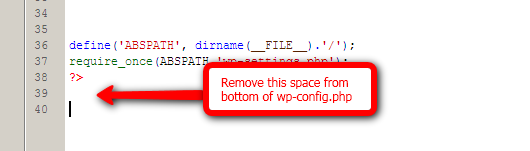
3. Remove Spaces from bottom of wp-config.php:
4. Save wp-config.php file and upload it to server again.
Voila!! You will see your error disappeared. Apart from this if you have any other solution for this problem then please post it in comment.